How to Use Headings for SEO Correctly (H1-H6)
If you’re a small business owner looking to improve your website’s visibility in search engines, understanding how to use headings and subheadings effectively is key. Headings (like H1, H2, and H3) help structure your content, making it easier for visitors to read and for search engines to understan
If you’re a small business owner looking to improve your website’s visibility in search engines, understanding how to use headings and subheadings effectively is key. Headings (like H1, H2, and H3) help structure your content, making it easier for visitors to read and for search engines to understand your page’s relevance. In this guide, we’ll walk you through why headings are important for SEO, how to use them correctly and provide step-by-step instructions for adding them on popular platforms like Shopify, WordPress, Wix, Webflow, and Squarespace. No technical expertise is required. Just follow along using our step-by-step guides below.
What Are Headings and Subheadings?
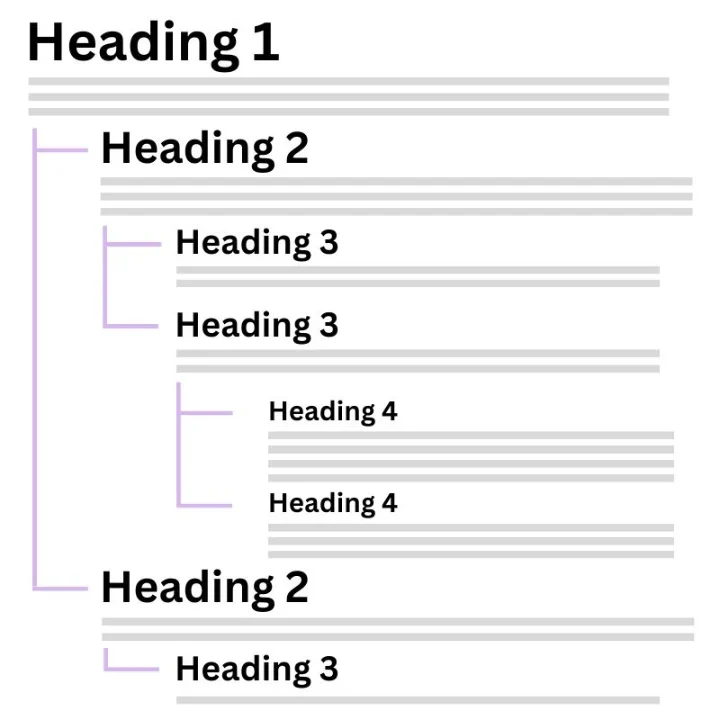
Headings (H1, H2, H3, etc.) are like the titles and subtitles in your content. They help break down your text into sections and subsections, making it easier for people to read and understand. The H1 tag is the main title of your page, while H2 and H3 tags are used for sections and subsections. This structure not only makes your content more accessible but also helps search engines figure out what your page is about, which can improve your search rankings.
Think of it like this: if your website were a book, the H1 would be the book’s title, H2s would be the chapter titles, and H3s would be the section titles within those chapters.
They appear in a website’s code like this <h1>Example Heading</h1>.
Why Headings Are Important for SEO
Headings aren’t just for making your content look neat. They’re also important for SEO. Search engines like Google and Bing use headings to index your content and understand what your page is about. The H1 tag tells the search engine the main topic of your page, so it should include your primary keywords. Subsequent headings, like H2s and H3s, help break down the content into specific topics and subtopics, making it easier for search engines to understand and rank your page.
When done correctly, using headings can help your page rank higher in search results, leading to more visibility and traffic to your website.
How to Use Headings on Different Platforms
How to Use Headings on Shopify

Adding headings and subheadings on Shopify is straightforward, even if you’re not a tech expert. Here’s how you can do it:
1. Log in to Shopify: Go to your Shopify admin dashboard.
2. Navigate to Online Store > Themes: Click “Customize” next to your current theme.
3. Edit Your Page: Go to the page or product you want to edit.
4. Add or Edit Text: Click on the text area where you want to add a heading.
5. Select Heading Style: In the text editor, highlight the text you want to turn into a heading. Then, click on the “Paragraph” dropdown in the toolbar and choose your desired heading level (H1, H2, H3, etc.).
6. Save Your Changes: Click “Save” to apply the changes.
How to Use Headings on WordPress

WordPress is one of the most popular platforms, and it’s very easy to add headings:
1. Log in to WordPress: Access your WordPress dashboard.
2. Create or Edit a Post/Page: Navigate to “Posts” or “Pages” and select the one you want to edit, or create a new one.
3. Use the Block Editor: In the Gutenberg editor, each piece of content is in a block. To add a heading, click on the “+” sign to add a new block.
4. Select Heading Block: Choose “Heading” from the block options.
5. Set Heading Level: After adding your heading, you can choose the level (H1, H2, H3, etc.) from the block toolbar.
6. Save Your Post/Page: Click “Update” or “Publish” to save your changes.
How to Use Headings on Wix

Wix is another user-friendly platform where adding headings is simple:
1. Log in to Wix: Go to your Wix dashboard.
2. Edit Your Site: Click on “Edit Site” to enter the Wix editor.
3. Select Text Element: Click on the text element where you want to add a heading.
4. Choose Heading Style: In the toolbar, click on “Edit Text,” then select the desired heading style (H1, H2, H3, etc.) from the dropdown menu.
5. Customize Your Heading: You can also change the font, size, and color to match your website’s design.
6. Save Your Work: Click “Save” and then “Publish” to apply your changes.
How to Use Headings on Webflow

Webflow offers more design flexibility, and here’s how you can manage headings:
1. Log in to Webflow: Access your Webflow dashboard.
2. Open Your Project: Select the project you want to work on and click on “Designer.”
3. Add a Heading Element: In the designer view, drag and drop a “Heading” element onto your page.
4. Choose Heading Level: After adding the heading, select the level (H1, H2, H3, etc.) from the settings panel on the right.
5. Style Your Heading: You can customise the heading’s font, size, colour, and more directly in the designer.
6. Publish Your Site: Click “Publish” to make your changes live.
How to Use Headings on Squarespace

Squarespace is known for its clean, modern designs. Here’s how to add headings:
1. Log in to Squarespace: Access your Squarespace account.
2. Edit Your Page: Navigate to the page you want to edit and click “Edit.”
3. Add Text Block: Click the “+” icon to add a new block and select “Text.”
4. Format Your Heading: Highlight the text you want to turn into a heading. Then, use the toolbar to select the heading style (H1, H2, H3, etc.).
5. Customise the Heading: Adjust the font, size, and color using the style editor if needed.
6. Save and Publish: Click “Save” and then “Publish” to apply the changes.
Enhancing User Experience and SEO with Structured Content
Using headings and subheadings not only makes your content easier to read but also helps with SEO. A well-structured page with clear headings improves user experience, as visitors can quickly find the information they need. This can lead to lower bounce rates and higher engagement on your site.
From an SEO perspective, structured content helps search engines better understand your page, which can improve your rankings in search results. By following the steps provided for your platform, you can easily optimise your content to benefit both your users and your search engine performance.
Best Practices for Using Headings in Content for SEO
To ensure your headings are effective for both users and SEO, follow these best practices:
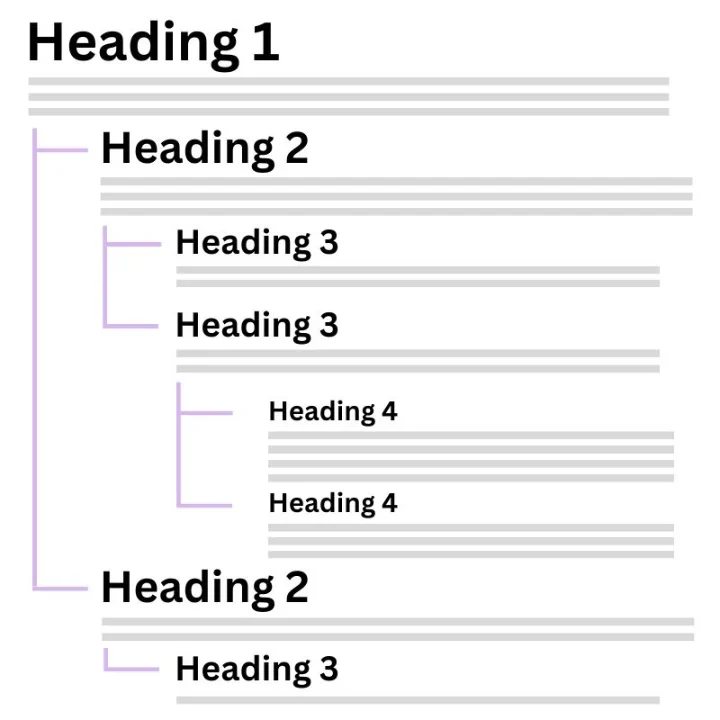
• Use One H1 Tag Per Page: This should clearly define the main topic of your page and include primary keywords.
• Organise Content with H2 and H3 Tags: Use H2 for main sections and H3 for subsections. These should contain relevant keywords to help search engines understand the structure of your content.
• Keep Headings Concise and Descriptive: Short, descriptive headings are easier to read and scan, making your content more accessible.
• Avoid Overstuffing Keywords: Keywords should be included naturally; overloading headings with keywords can hurt your SEO.
• Maintain Consistency: Consistent use of headings across all your pages helps users and search engines navigate your site more effectively.
Common Mistakes to Avoid When Using Headings for SEO
To avoid negatively impacting your SEO, steer clear of these common mistakes:
• Using Multiple H1 Tags: Stick to one H1 tag per page to clearly signal to search engines what the main topic of your content is. Multiple H1 tags can confuse search engines and dilute the effectiveness of your content’s structure.
• Skipping Heading Levels: It’s important to maintain a logical hierarchy with your headings. For instance, don’t jump directly from an H1 to an H3; use an H2 first to create a clear structure. This helps users and search engines understand the flow and importance of the information on your page.
• Making Headings Too Long or Irrelevant: Headings should be concise and directly related to the content that follows. Long or irrelevant headings can confuse readers and dilute the focus of your content, which can negatively impact user engagement and SEO.
• Ignoring Mobile Optimisation: Ensure that your headings and content are mobile-friendly. On mobile devices, headings should be easy to read and should not cause the layout to break or become difficult to navigate. Mobile usability is a significant factor in SEO rankings, so it’s essential to check how your headings appear on smaller screens.
Tools to Help You Structure Headings for SEO
If you’re unsure about how to implement or optimise headings on your site, several tools can assist you:
1. Yoast SEO (for WordPress)
Yoast SEO is a widely used plugin for WordPress that simplifies the process of managing headings and other on-page SEO elements. It provides real-time feedback on your content’s SEO performance, including an analysis of how well you’re using headings. Yoast SEO helps ensure you have a single H1 tag, properly ordered subheadings, and keywords placed appropriately in your headings.
How to Use Yoast for heading structure:
• After installing and activating Yoast SEO, navigate to the post or page you want to edit in your WordPress dashboard.
• Scroll down to the Yoast SEO section beneath the content editor, where you’ll find insights into your content’s SEO, including specific feedback on heading structure.
• Use Yoast’s suggestions to adjust your headings, ensuring your content is well-structured and optimised for search engines.
For more details on how to use this tool, visit the Yoast SEO plugin.
2. RankMath (for WordPress)
RankMath is another powerful SEO plugin for WordPress, offering a comprehensive suite of tools to help optimise your website. Like Yoast, RankMath provides detailed insights into how your headings are structured, ensuring that your content is both user-friendly and search engine-friendly. One of RankMath’s strengths is its user-friendly interface, which integrates seamlessly into the WordPress editor, offering actionable tips and suggestions as you write.
How to Use RankMath for Heading Structure:
• Install and activate the RankMath plugin from the WordPress plugin directory.
• When editing a post or page, scroll to the RankMath SEO section where you’ll see a score and recommendations.
• RankMath will highlight any issues with your headings, such as multiple H1s or missing keywords in your subheadings.
• Follow the recommendations to adjust your headings, ensuring that they follow best practices for SEO.
Comparison with Yoast:
• User Interface: RankMath’s interface is slightly more modern and user-friendly compared to Yoast, making it easier for beginners to navigate.
• Advanced Features: RankMath includes some advanced features in its free version that Yoast typically reserves for its premium users, such as advanced schema markup options and a built-in 404 monitor.
• SEO Analysis: RankMath provides a detailed SEO analysis, including tips on heading structure, which is similar to Yoast but with more customization options.
For more information about RankMath, you can visit the RankMath SEO plugin.
3. Google Search Console
Google Search Console is a free tool that provides insights into how Google views your site. It allows you to check your site’s structure, including the use of headings, and identify issues that might be affecting your SEO. This tool is particularly useful for diagnosing and fixing structural issues that could impact your search rankings.
How to Use Google Search Console for Heading Tags:
• Log in to Google Search Console and select your website.
• Navigate to the “Coverage” or “Enhancements” section to see if there are any issues related to your site’s structure.
• Use the “URL Inspection” tool to check specific pages for issues with headings and other SEO elements.
External Link:
For more information, visit the Google Search Console Help Center.
4. Screaming Frog
Screaming Frog is a website crawler that lets you analyse your site’s structure, including heading usage. It’s particularly useful for larger sites where manually checking each page isn’t feasible. Screaming Frog can identify multiple H1 tags, missing H1s, or any other heading issues across your entire site.
How to Use Screaming Frog to Help with Heading Structure:
• Download and install Screaming Frog (a free version is available with limited features).
• Run a crawl on your website.
• Once the crawl is complete, navigate to the “H1” or “H2” tabs to review how headings are being used across your site.
• Use the data to correct any issues and ensure your headings are optimised for SEO.
External Link:
For more details, visit the Screaming Frog website.
Conclusion
Using headings and subheadings effectively is a straightforward yet powerful way to improve your website’s user experience and SEO. By following the best practices outlined in this guide and using the recommended tools, you can ensure that your content is structured in a way that is accessible, engaging, and optimised for search engines.
Whether you’re using Shopify, WordPress, Wix, Webflow, or Squarespace, the process of adding and optimising headings doesn’t require technical expertise. Just a little time and attention to detail. Take a moment to review your current content, apply these strategies, and watch as your site’s visibility and user engagement improve.
If you’re looking for more tips on improving your digital marketing, check out our comprehensive guide, The Ultimate Guide to Digital Marketing for E-Commerce. And remember, if you ever need assistance or have questions, contact us. We’re here to help you!